Hick’s law states that there is a predictable increase in the time it takes somebody to decide, as the number of options goes up. Yet we regularly bombard users with options on our websites.
Keeping options simple and straightforward on your website rarely works against you. In fact, I believe you are doing your customer a favour by reducing the need for weighing up options before proceeding with a transaction.
Paul’s, tweet reminds me of a post Lou wrote (back in 2015!) called Drowning in Choice.
Barry Schwartz in his book The Paradox of Choice, says that at the point where the effort to make an informed decision overtakes the benefit of having a choice, then “choice no longer liberates but debilitates. It might even be said to tyrannise.”
Highlights – Google will recommend ones you can add e.g Sink Green
Description – Does not impact on rank, could help conversions. Show what you can do and how you help
Add Products / Services
Recent updates to this as now split into categories, worth reviewing
May have products instead (dependant on category)
Add Photos and videos
Photos
Anything that showcases your business
Identity – Business logo, cover image, etc
Team – your team in action, around the office, etc
If you category allows: 360, Inside and out of office or store
Videos
A welcome video or tour of the store
Why your company stands out versus the competition
The company mission, and goals.
An inside look at daily operations and customer interactions
Customer testimonials
Owner, employees, or customers interviews
Answer FAQs
Posts
What’s New – Limited to seven days, can be up to 1000 words. General updates, blog posts, customer showcase
Events – Promote an event you are hosting, involved in, or supporting. All events require a title, start & end dates, and time. Add a description and details too.
Offers: If you are having any promotions, sales, or coupons, you can use this post type to showcase them. Like events, offers also require titles, start & end dates, and time-frame. The “View offer” CTA is automatically added.
Questions & answers
Make sure to monitor, I don’t always get emails
Create your own FAQs
Perhaps ask clients to seed the questions for you?
For this episode I thought it would be good to revisit a conversation I had with Sarah Dixon from the Contract Store on what details and documents we need to have on the website to make sure we don’t fall foul of the law. We cover all the fun stuff from Ecommerce terms and conditions to GDPR. Enjoy!
👋 If you found this podcast interesting you might like my Marketing Club. Join to receive regular tips and advice on marketing, video and the web and Pro Members get access to my live marketing webinars every month, exclusive discounts and other perks. Find out more here https://ratherinventive.com/club/
‘Whether it is a website, a software application or a smartphone app, it’s about first designing the structure of how your information is organized, and then translating this into a logical navigation hierarchy that makes sense to the users who will be accessing it. In this world where we can sometimes feel as though we are drowning in data, information architecture provides us with a logical way of organizing this data to make it easier to locate.’
Content structure is a core part of my web design process and in a large part informs the visual design of the website.
In my early design days I used to draw out the site using dummy text or images in illustrator, get the design signed off by the client then build the HTML and shoehorn in the content. We’d always get it to work but there was a lot of refactoring the design to fit. It’s completely backward when you think about it but it’s how most of the industry worked.
If you think content structure on a website is important (and you really should) then after you’ve read Carrie’s article you should also check out the book Content Design by Sarah Richards. It’s an easy read and explains why designing your content will have the biggest impact on your site visitor. Her experience is informed, in part, by her time at GOV.UK.
‘Today we announced that we’re bringing free listings to the Shopping tab in countries across Europe, Asia, and Latin America. Just as we don’t charge sites to be part of the Google Search index, listings for participating retailers are eligible to appear in these results at no cost to them. Paid listings will continue to appear in ad slots and will operate in the same way as Shopping ads do today.’
I’m glad they’ve made this change. This used to be the norm for the product feed until they made it ad supported only.
Learn how to better understand your customer and fulfil your customers needs with more targeted products
Notes
Two ways to address a customer need
Solve a problem
Support the life goal
Solve a problem
Hungry – Need food
Back pain – Take medication
10mm hole – Need a drill / laser cutter / punch
More social engagement – Need interesting posts / followers / video
Support a life goal
Move someone from where they are to where they want to be
Jobs To Be Done ‘…your efforts should focus on helping them make that change. Ideally the consumers wouldn’t have to do any work.’
Not to be hungry – Food
Be fit and health – Medication / Diet / Exercise / Physio
Sell more widgets with holes Tools / Contractor / Automation
More leads – Focused sales strategy / Sales team / Outsource
‘When we buy a product, we essentially “hire” it to help us do a job. If it does the job well, the next time we’re confronted with the same job, we tend to hire that product again. And if it does a crummy job, we “fire” it and look for an alternative.’
Question: Why do customers hire you? Why do people hire the IMC?
Build a customer profile
Start simply, add detail as you learn more
Describe your customer in five words Good place to start Here’s Ben’s: Passionate Professional, Mac user, 40
What are your customers goals? How your product helps achieve these goals?
Customer Goal / Product Aim
Lose weight / Simple diet
Feel healthier / Exercise plan
Meet new friends / Group meet-ups
Other considerations
Awareness
How do customers describe the product?
Where do they look for recommendation?
How can we reach them?
What’s your backstory?
Why should they care?
Consideration
What do they know already?
How will they compare us?
How long will this process take?
What questions can you help answer?
Decision
What do they need to know to make a decision? Price, delivery, returns…
Who will make the decision?
How do they buy from us?
And how can we make this easy?
Paradox of choice
We’re addicted to choice Broadly seen as a good thing Taken to extremes
Search waitrose.com for “cheese” 564 results found 136 Cheddar products (was 108!) Choose from Mild, Medium, Farmhouse, Mature, Extra Mature & Vintage (10 products) Most expensive, No.1 Rollright £29.50/kg
What if I made the wrong choice Missed a better option Able to research options endlessly, the internet makes things harder
How do we cope with choice? Dozens of sizes, prices and features Opinions from friends, magazines, podcasts Mental energy to make informed decision Decision overload
End up differentiating on price Why we think choice is a good but actually it paralyses us
Restaurants are the worst Large menu plus specials board First 10 minutes not deciding After meal – unlimited coffee choices! Decisions left un-made by the designer (chef) We need to make decisions for our customers Reduce choice and anxiety Increase the throughput
Thali Restaurant Vegetarian curry house – Bristol 2 set meal times, 2 set menus, one fixed price Make it easy for me, keep it simple
Use choice to your advantage Experiment with 2 beers, 80% chose most expensive, 20% least expensive Add 3rd option, 80% chose middle, 20% choose expensive No one bought the cheapest – Have 3 options
“seeking the perfect choice is not only a recipe for misery but more than likely does not actually exist.” – Barry Schwartz from book “Paradox of choice”
There is no perfect choice. Don’t beat yourself up about it
No decision is the worst decision Why we think choice is a good thing but actually it paralyses us
Getting feedback
Helps to understand the customer better and deepens customer relationship
Learn to talk you customers language
Use testimonial text in your copy Reflect language back in conversation Use to improve customer persona
Bring your customers closer
A positive review reinforces your opinion of a company More likely to refer to others
IMC Club Member Nicky Ayers from Ecl-ips shares her thoughts and feedback on how the Inventive Marketing Club has impacted and helped improve their business marketing.
👋 If you found this testimonial inspiring join my Marketing Club to receive regular tips and advice on marketing, video and the web. Pro Members get access to my live marketing webinars every month, exclusive discounts and other perks. Find out more here https://ratherinventive.com/club/
‘It wasn’t until my manager encouraged me to shut up, watch, and listen. Give people space, observe what they’re interested in, keep an eye on their behavior, and be genuinely curious about what they wanted for themselves, not what I wanted for them. Essentially, stop selling and start listening.’
This can work in any relationship or negotiation. It’s something we all find hard, me included. Here’s another nugget
‘They didn’t care about the precise weight, or that this brand shaved 0.5oz off the model this year compared to last. They didn’t care what the color was called, only that they liked it (or didn’t). The tech- nical qualities weren’t important – in fact, they were irrelevant.’
Don’t focus on the features, focus on the benefit to your customer. It the case of shoes it could be how they make them feel not what they can do.
Listening is a crucial attribute of a successful sales person. If you listen well, your potential customer will always tell you what they want and how you can sell it to them.
Do you want to see your website appear first on Google whenever you search for the key words relevant to your business? Do you often wonder why your competitors appear higher than you on Google when you think you are doing everything you should be?
In this workshop I will show you how to improve the ranking of your website on Google along with SEO tips, tools and techniques.
This episode features a walkthrough of creating a content page using the WordPress Block editor along with some tips on how to layout content.
This is just a short clip taken from my Pro Club Webinar IMC #10 WordPress walkthrough which was recorded at the end of last year. The WordPress editor has changed a little since then but fundamentally it works in the same way.
👋 If you found this podcast interesting you might like my Marketing Club. Join to receive regular tips and advice on marketing, video and the web and Pro Members get access to my live marketing webinars every month, exclusive discounts and other perks. Find out more here https://ratherinventive.com/club/
In this episode Ben walks your through how to use WordPress, from logging in to posting your first blog article.
Notes
Why WordPress?
Can get started for free on WordPress.com Completely flexible when self managed Lots of plugins such as woocommerce.com for commerce stores Best control over SEO (Search Engine Optimisation) Powers over 30% of the worlds websites Used by the biggest companies in the world: TechCrunch, Bloomberg, BBC America, Sony, Disney, Playstation, Facebook Has active community and developers
Screen-share and demo of self hosted WordPress Log in
1. Go to /wp-admin 2. Use forgotten password
Dashboard
1. Quick tour of key features 2. Check time location
Add pages
1. Create Home page 2. Add dummy content 3. Make sub title H2 4. Add an image. Name image ‘John Doe accountant profile’ 5. Link up CTA (Call To Action) 6. Publish 3. Add other pages About, Blog and Contact 4. Show page permalink
Customise
1. Change Title ‘Yellow Jumper Accountants’ and Strapline ‘Xero and Quickbooks specialists’ 2. Select logo 3. Add Main menu and add Home, About, Blog and Contact 4. Remove widgets Comments, Archives, Meta, Categories
There are so many different and varied ways to build a website from coding your own in HTML to using a Content Management Systems (CMS) such as Weebly, Squarespace or WordPress.
In this extract from club webinar #18 I talk through the pros, cons and costs of the top website builders out there.
👋 If you found this podcast interesting you might like my Marketing Club. Join to receive regular tips and advice on marketing, video and the web and Pro Members get access to my live marketing webinars every month, exclusive discounts and other perks. Find out more here https://ratherinventive.com/club/
Create a regular event in your diary Find a place that removes distractions Make a routine, start small
Keep it focused
Write for your audience Write the snippet first Read around the subject
Ask for action
Email signup Find out more Buy related product Get in contact for help
Images and video
Increases page views Helps people scan content More visible in a social feeds People more likely to read (Make sure you check the image license, can you use it for business?)
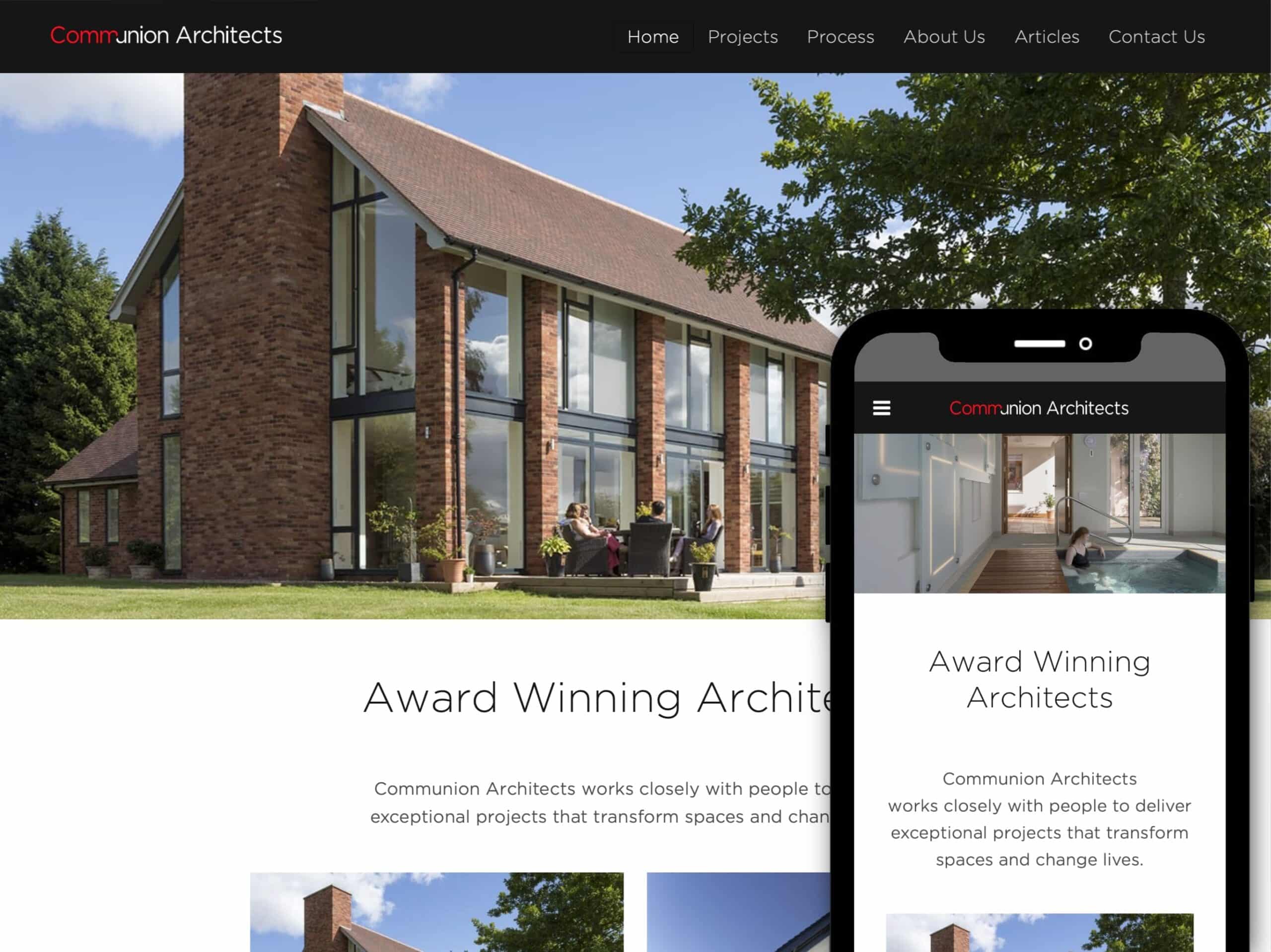
When Alex Coppock from Communion Architects first approached us in 2012, he was keen to explore ways to improve search engine rankings and bring more visitors to his website. Since then, his website has remained in top two organic keyword positions and website traffic has grown 10x.
Alex has always taken a very thoughtful approach to his website and I invited him to write an article reflecting on his journey with his website. What follows are his thoughts on how he has changed the way projects are featured on his website over the years from a simple way to showcase the buildings Communion has worked on to something that has a much wider purpose. To my mind, the shift beautifully reflects Communion’s generous, people-focused spirit and its mission statement – working closely with people to deliver exceptional projects that transform spaces and change lives.
This episode features an extract from a recent club webinar #18 where I share my entire process from planning to go live.
I talk about how best to plan your website, how to do a competitor review and tips on mapping out your site.
👋 If you found this podcast interesting you might like my Marketing Club. Join to receive regular tips and advice on marketing, video and the web and Pro Members get access to my live marketing webinars every month, exclusive discounts and other perks. Find out more here https://ratherinventive.com/club/
If you are writing content for the web and you want it to rank highly, you need to think about your competition. Not only does it help focus your SEO efforts but it can often give you ideas on what you need to include on your page.
‘A SERP competitor could have only one page that competes with you, but if that page is ranking above you on an important SERP, they are your competition and you need to understand why they are beating you.’
If you’re a Marketing Club member then you can find my competitor research process in the SEO Strategy webinar but I’d also check out this article from Andrew Dennis at Search Engine Land that goes through a simple process you can use.
Getting hooked on an endless scroll of media inputs is not the same as being informed. There’s long been a business model of urgent news (“man bites dog!”), but now it’s been leveraged, amplified and optimized to suck people in for hours at a time.
https://seths.blog/2020/07/doom-scrolling/
I limit my news intake to a handpicked set of websites via Feedly and aim to check in once or twice a day, I don’t rarely listen to the news and try to use Twitter as a last resort. I don’t want or need to know everything that happens as it rarely brings me joys but I simply don’t have time.
Best practices, how to prepare an image for the web or social media, handy tools and live demos.
Notes
File formats
Formats (JPEG, PNG, EPS SVG) Compression Best pixel size
Vector/icons
(respective sizes of example artwork) JPEG PNG SVG EPS 147KB 12KB 2KB 324KB
Raster/photos
5760 x 3840 (resolution of example photo)
(respective sizes of example artwork) JPEG 20% JPEG 40%. JPEG 80% JPEG 100% 471KB 628KB 1.4MB 9.7MB
Image dimensions
At least 1500px on the smallest edge Recommend 3000px Start with the biggest image possible Always keep the original
Naming images
Describing an image to someone over the phone Describe the content of the image in text Add keywords if you can, may show up in Google image search Name before you upload
A tabby cat in a wicker basket.jpg (example file name)
Live demos
Cutting out an image – Colour correction Social profile icon Social post YouTube thumbnail – Podcast cover art
Finding legal images online
Free and paid image libraries Free – www.pexels.com Free – pixabay.com Free – https://www.flickr.com Free – giphy.com (make sure you check license is for commercial use)
I’ve often heard the term ‘Hanlon’s Razor’ – usually on tech podcasts – in relation companies doing the wrong thing and where people assume the worst and jump to conclusions. so decided to look it up.
‘Never attribute to malice that which is adequately explained by stupidity’
Robert J. Hanlon
An example of this can be seen when Apple was accused of slowing down old iPhones to force people to upgrade, where in fact an update was made to improve the performance of phones with older batteries by slowing them down a little to prevent a high peak power drawn causing the phone to crash.
The same effect can be seen on social media when people jump on the back of a scandalous story.
Modern media treats outrage as a profitable commodity. This often takes the form of articles which attribute malice to that which could be explained by incompetence or ignorance. We see examples of this play out in the media multiple times a day. People rush to take offense (sic) at anything which contradicts their worldview or which they imagine to do so. Media outlets are becoming increasingly skilled at generating assumptions of malicious intent. When looking at newspapers, websites, and social media, it can be beneficial to apply Hanlon’s razor to what we see.
The lesson I take is not to see the worst in peoples mistakes but to assume they are busy, forgetful or hassled like the rest of us and to give them the benefit of the doubt. At least the first time. Not only will it help you to stay calm but it will also moderate your response and prevent a situation from escalating.
The quoted article from FS above, dives into detail as well as explaining other popular terms like Occam’s Razer. Well worth a read.
The pandemic has moved us to new ways of doing things. We’re having to adapt and change to meet the needs of our customers, which now include meeting the social distancing requirements. So how can you make the most of the online tools that are available to both market and sell your business virtually?
In this webinar, I will share some great ideas on using online tools such as Social Media, Video and Augmented Reality (AR) to connect with your customers so you come out of this stronger together.
Back in July last year I spoke with Tess Coughlan-Allen about planning the content for your website, along with tips for getting started and a helpful tool to map out your content.
I firmly believe that websites should be built around the content first and is actually a key part of the design process.
If you are starting a new web project or revising your current site you’ll find real value in this conversation.
👋 If you found this podcast interesting you might like my Marketing Club. Join to receive regular tips and advice on marketing, video and the web and Pro Members get access to my live marketing webinars every month, exclusive discounts and other perks. Find out more here https://ratherinventive.com/club/
A study of behavior (sic) at breakfast buffets showed that the first item in the buffet was taken by 75% of the diners (even when the order of the items was reversed) and that two-thirds of all the food taken came from the first three items, regardless of how long the buffet is.
The study Seth mentions is an interesting read but only cites one small experiment. However I have noticed similar behaviour on our client websites, such as; the first menu items often get the most visits, the first few at the top are clicked on most but, unlike the study, I have no science to support this.
How to improve your website content and structure with an aim of getting to page one in Google.
Notes
What is Search Engine Optimisation (SEO)?
Making changes to your website that you know (or believe) will gain a higher position in search engine results for a given keyword search There are many search engines We’ll focus on Google:
Why people search
Do something e.g. ’camping france’
Know something e.g. ’how to fix washing machine’
Go somewhere e.g. ’facebook’
First five results get 68% of clicks Desktop & mobile ranking position CTR 2014 data from Moz.com
Terms you should know
SERP – Search Engine Ranking Position
Snippet – Information on a Google search result
Impression – How often your snippet shown
CTR – Click Through Rate. Number of clicks compared to impressions
Keyword – A phrase used to find something online
Long tail – A long and specific keyword phrase
Keywords and how to find them
What keywords do people use to find services like yours online?
Keyword examples: “accountant” “cirencester accountants” “accountants in cirencester” “how to prepare end of year accounts”
Google Trends for simple comparison
Broad, simple keywords
Keyword Research
Google Keyword planner for advanced searches
Related searches on Google
Create content that search engines will love and people will share
Find the best keywords to rank for
Find out who else is ranking for them
Create content that’s better than those pages
Meta Descriptions: Writing a snippet is a great way to start writing content
Blog Content
Help Content
Content Checklist
Must have keyword on the page
Keyword order and spelling often matter
Content of page must be relevant to keyword
Avoid ‘thin’ content. Write enough to answer the question
Write for people not search engines
Page structure development
Link to main pages Adding keywords to images Simple URLs
Link to page on your site <a href=“/bookkeeping/”>Bookkeeping</a>
Add no follow if you don’t want to pass any Google SEO credit
“If you create a page on a keyword that is 10x better than the pages being shown in search results (for that keyword), Google will reward you for it, and better yet, you’ll naturally get people linking to it!” https://moz.com/beginners-guide-to-seo/on-page-seo
Images
Describe the content of the image in text <img src=“tabby-cat-in-wicker-basket.jpg” alt=“A tabby cat in a wicker basket”/>
Add keywords in if you can. Can then show up on image search
Short and human readable i.e. /blog/how-to-fix-washing-machine’
Use hyphens ‘-‘ not spaces
Yoast SEO WordPress Plugin
Getting linked
Links from other websites (often called backlinks) can be most beneficial
Self created
Links by you to other sites e.g. directories
Natural: Referenced by another website because your content is awesome
Manual outreach: Asked for the link or guest blog post
Do Measure Repeat
Use Google Search Console to track performance Tweak site slowly to look for improvements