
Inventive Popup Blocks
WordPress Plugin
Add flexible popup content to WordPress pages.
Create popup panels with standard WordPress blocks, then open them from ordinary links or buttons.
Version 1.3 · Free download · WordPress 6.5+ · PHP 7.4+

What does Popup Blocks do?
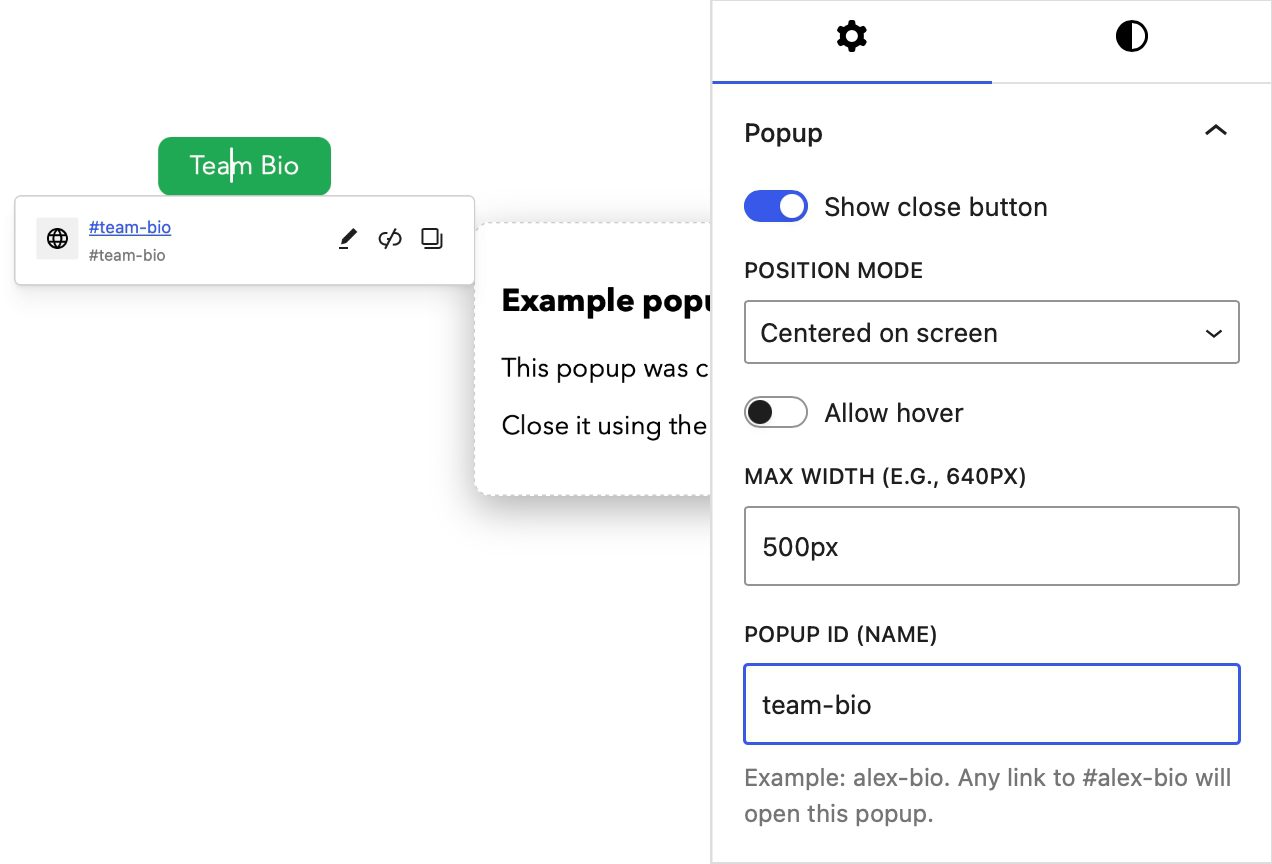
Inventive Popup Blocks adds a Popup Content block to the WordPress editor. Add text, images, forms or other blocks inside it, give the popup a unique ID, and link to that ID from anywhere on the page.
The popup can contain paragraphs, headings, images, forms, buttons and other supported blocks.
Plugin features
- Build popup content with standard WordPress blocks.
- Open a popup from an ordinary link, button or custom element.
- Position the popup beneath its trigger or in the centre of the screen.
- Set a maximum width and optionally display a close button.
- Close popups using the close button, backdrop, Escape key or an outside click.
- Keep keyboard focus inside click-operated popup dialogs.
- Restore focus to the original trigger when a popup closes.
- Reopen popups containing form validation errors after submission.
How to use it
- Download and install the plugin through Plugins → Add Plugin → Upload Plugin.
- Activate Inventive Popup Blocks.
- Add a Popup Content block to your page.
- Enter a unique Popup ID, such as
team-bio. - Add a link or button and set its URL to
#team-bio.
Important: Each Popup ID must be unique on the page. The link URL must contain the same ID preceded by a hash symbol.
Live popup example
The button below opens a Popup Content block created directly in the WordPress block editor.
Example popup

This popup was created with the Inventive Popup Content block. You can add other WordPress blocks here, including images, lists, buttons and forms.
Close it using the button, the shaded backdrop or the Escape key.
Accessibility
Click-operated popups use dialog semantics, move keyboard focus into the popup, keep focus inside it while open, close with the Escape key and return focus to the original trigger.
Website authors remain responsible for providing clear link text and accessible content inside each popup. Important content and controls should use click-operated popups so they remain available to keyboard and touchscreen users.
Plugin support
Inventive Popup Blocks is provided free of charge and “as is”, without warranty. You are responsible for testing it on a staging site and confirming that it is suitable for your website before using it in production.
You are welcome to contact Rather Inventive to report a problem or suggest an improvement. However, free installation, configuration and troubleshooting support is not included. Paid assistance may be available by arrangement.
Privacy
The plugin does not set cookies or send visitor content to Rather Inventive. WordPress makes a periodic HTTPS request to the update manifest when checking for plugin updates.
Requirements and limitations
- Requires WordPress 6.5 or later and PHP 7.4 or later.
- Popup IDs must be unique on each page.
- The plugin does not provide analytics or track popup interactions.
- The optional hover mode is retained for compatibility but is not recommended for important interactive content.
- Theme and page-builder styles may affect the appearance of content placed inside a popup.
Version 1.3 release notes
- Added Gutenberg Popup Content blocks.
- Added secure popup and trigger shortcodes for WPBakery and other editors.
- Added keyboard focus handling and responsive popup sizing.
- Prevented transformed or clipped page-builder rows from covering popups.
- Added cache-resistant versioned frontend assets.
- Added secure, checksum-verified WordPress updates.