
Inventive Share Preview
WordPress Plugin
Easily share unpublished WordPress posts and pages.
Create secure, expiring preview links for clients and colleagues without giving them a WordPress login.
Version 1.0 · Free download · WordPress 6.2+ · PHP 7.4+

What does Share Preview do?
Inventive Share Preview creates a private link for draft, pending-review and scheduled WordPress content. Anyone with the link can see that post until the link expires or you revoke it.
It is a simple way to send a page to a client for approval, ask a colleague to check an article or review scheduled content on the real website before publication.
Plugin features
- Shares draft, pending-review and scheduled content.
- Works with posts, pages and selected registered post types.
- Creates links only when an editor explicitly requests one.
- Lets you choose a link lifetime from 1 to 90 days.
- Creates, regenerates and revokes links without reloading the editor.
- Records who created each new link and when.
- Shows active links in an administrator-only overview.
- Can expire every preview link immediately.
- Redirects a valid old share-preview link to the public page after publication.
- Lets you customise the private-preview banner.
- Prevents caching and asks search engines not to index previews.
How to use it
- Download and install the plugin through Plugins → Add Plugin → Upload Plugin.
- Activate it, then open Settings → Share Preview.
- Select the post types you want to share and choose how long links should work.
- Save a post as a draft, pending review or scheduled post.
- Open the Share Preview panel, copy the link and send it to your reviewer.
Important: Treat a preview link like a password. Anyone who receives it can view that unpublished post until the link expires or is revoked.
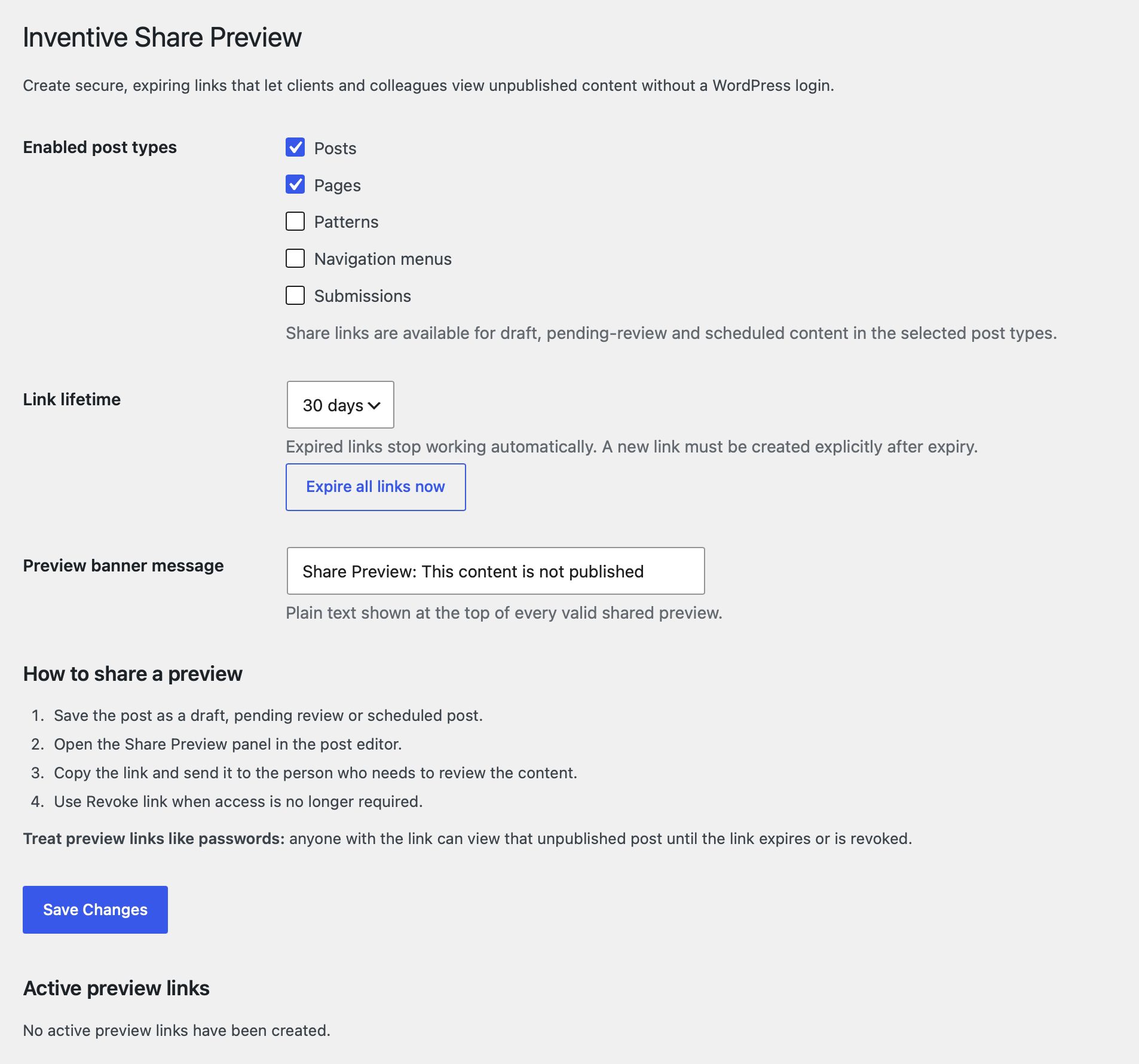
Simple settings
Choose which registered post types support preview links and how long each link remains valid. Posts and pages are enabled by default. You can also customise the preview banner, review active links and expire every link immediately.
Clear for reviewers
Every shared page displays a green banner explaining that the visitor is looking at private, unpublished content. The page itself uses the normal website theme, so reviewers see the content in context.
Plugin support
Inventive Share Preview is provided free of charge and “as is”, without warranty. You are responsible for testing it on a staging site and confirming that it is suitable for your website before using it in production.
You are welcome to contact Rather Inventive to report a problem or suggest an improvement. Free installation, configuration and troubleshooting support is not included. Paid assistance may be available by arrangement.
Security and privacy
- Preview links use random per-post tokens and constant-time validation.
- Links are created explicitly and can be regenerated or revoked.
- Invalid, expired and revoked links return a 404 response.
- After publication, old share-preview URLs redirect to the public permalink.
- Preview responses are marked noindex, nofollow and noarchive and send private no-cache headers.
- The plugin does not set cookies, load third-party scripts or send preview content to Rather Inventive.
Requirements and limitations
- Requires WordPress 6.2 or later and PHP 7.4 or later.
- Supports draft, pending-review and scheduled content. Private and trashed content cannot be viewed using a share link.
- Anyone with a working link can view that individual post, so links should only be sent to intended reviewers.
- Server and CDN caches must exclude
/share-preview/URLs. Analytics and session-recording tools should also be disabled on previews because the URL contains the access token.
Version 1.0 release notes
- Initial production release.
- Added expiring links for posts, pages and selected registered post types.
- Added reload-free editor controls and post-list shortcuts.
- Added creator tracking, an active-link overview and global expiry control.
- Added a customisable private-preview banner.
- Added safe redirects to published content.
- Added invalid-link protection, private no-cache headers and search-engine directives.
- Added secure, checksum-verified WordPress updates.